
One Cron to Rule Them All: Introducing Mautic Cron Orchestrator
Replace a long list of Mautic system crons with a single mautic:cron:run entry and manage jobs in the admin UI—presets, schedules, run history, and duration.
If you have ever opened a Mautic server’s crontab, you know the ritual: a growing list of mautic:segments:update, mautic:campaigns:trigger, mautic:messages:send, webhooks, imports, reports… Each line has its own schedule. Each one is easy to forget, duplicate, or leave running after you no longer need it.
That is a fragile way to run marketing automation infrastructure.
Mautic Cron Orchestrator flips the model. You keep one system cron calling mautic:cron:run every minute. Which jobs actually run—and how often—lives in the Mautic UI, in the database, where you can see it.
Why Mautic cron setup gets messy
Official Mautic docs recommend several console commands on a timer. That works until:
- two overlapping presets leave duplicate jobs
- someone edits crontab on one server and not another
- a job fails silently and you have no history in the product UI
- you want to pause one task without SSH
Operations teams need a single source of truth. Cron Orchestrator is that source for maintenance jobs.
What Mautic Cron Orchestrator does
- Replaces individual Mautic cron lines with
mautic:cron:run(once per minute). - Ships Minimal, Standard, and Full presets aligned with the official Mautic cron jobs guide.
- Lets admins enable/disable jobs, change frequency, run a job now, or delete it.
- Stores run history (status, exit code, output, duration).
- Respects the standard Plugins Enabled switch—when off, the UI is gone and the command does nothing.
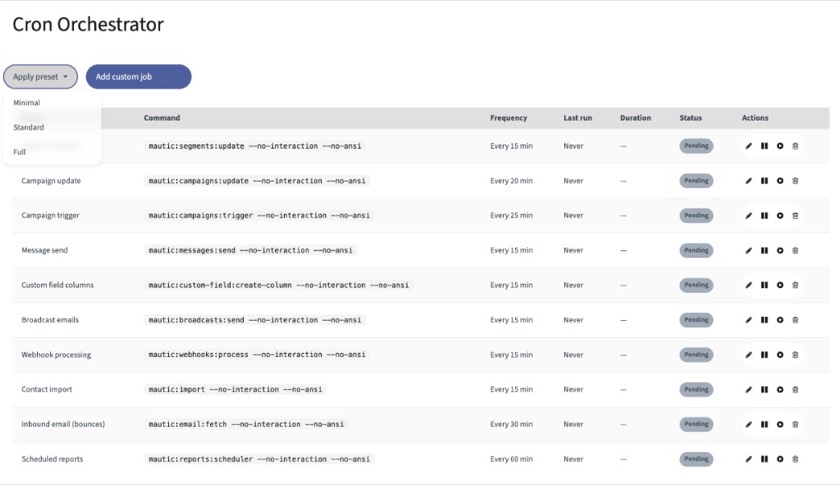
Job list after applying the Standard preset: frequencies, last run, duration, and status in one place.
Cron presets instead of copy-paste
Applying a preset replaces the built-in jobs (minimal / standard / full) and leaves your custom jobs alone. Core segment and campaign commands are slightly staggered (15 / 20 / 25 minutes) so they are less likely to pile up in the same minute. Preset commands include --no-interaction --no-ansi for clean CLI runs.
| Preset | Typical use |
|---|---|
| Minimal | Required jobs only (small installs) |
| Standard | Most production sites (+ broadcasts, webhooks, import, bounce fetch, reports) |
| Full | Full feature set / compliance extras (GeoIP, cleanup, MaxMind, social, exports, …) |
Track job duration in the UI
Each run records duration. On the list you get a Duration column next to Last run. On the job detail page, recent runs show status, timestamp, duration, exit code, and output.
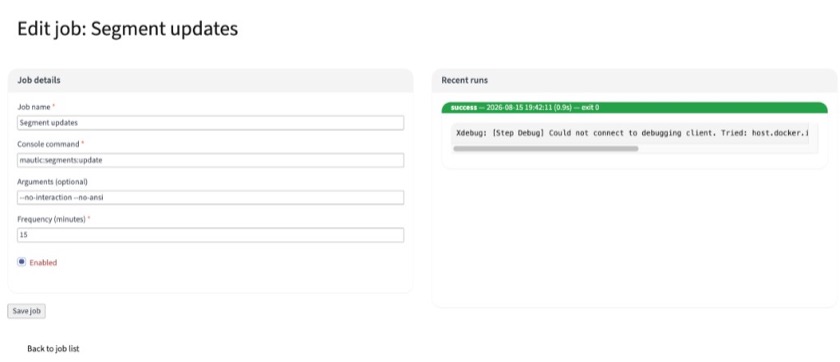
Job detail: edit schedule and arguments, then review recent runs—including duration.
Access and safety
- UI is under Settings → Cron Jobs and is limited to admin users.
- The plugin must be Enabled in Plugins settings. Disabled = no menu, access denied on
/s/cron, andmautic:cron:runexits without executing jobs.
How to install Mautic Cron Orchestrator (Packagist)
From your Mautic project root:
composer require mauticinsights/mautic-cron-orchestrator
php bin/console cache:clear --env=prod
php bin/console mautic:plugins:reload
Then open Settings → Plugins → Cron Orchestrator, set Enabled to Yes, and save.
- Package: mauticinsights/mautic-cron-orchestrator on Packagist
- Source: github.com/mauticinsights/mautic-cron-orchestrator
System cron configuration
Remove the old individual mautic:* lines so jobs do not run twice. Keep a single entry.
User crontab (crontab -e as www-data):
* * * * * /usr/bin/php /path/to/mautic/bin/console mautic:cron:runSystem crontab (/etc/crontab — note the username column):
* * * * * www-data /usr/bin/php /path/to/mautic/bin/console mautic:cron:runUseful checks:
php bin/console mautic:cron:run --dry-run
php bin/console mautic:cron:run --cleanup-only
Why this matters for Mautic operations
Mautic’s power is in automation that keeps moving: segments, campaigns, messages, webhooks. Those depend on cron more than most operators admit. Putting schedules into the product—with presets, history, and duration—reduces “it worked on the server we forgot to update” failures.
One system cron. Clear jobs in the UI. Visible runs.
That is Mautic Cron Orchestrator.